URL 파라미터 통한 클라이언트 상태 관리 진화 히스토리: 야매 → 혼돈 → 완성 (React & Vue)
URL 파라미터 관리 진화 히스토리: 야매 → 혼돈 → 완성 (React & Vue)
웹 애플리케이션에서 검색 조건, 필터링, 페이지네이션 등의 상태 관리는 사용자 경험을 좌우하는 핵심 요소입니다. 특히 브라우저 뒤로가기/앞으로가기, URL 공유, 새로고침 시 상태 유지 등을 지원하기 위해서는 체계적인 접근이 필요합니다.
본 문서는 실제 프로덕션 환경에서 3년 가량 프로젝트를 진행하면서 겪은 3단계 진화 과정을 통해 React와 Vue 모두에서 URL 파라미터 관리 및 로컬 상태 관리를 이렇게 관리하면 최적화가 되지 않을까 라고 생각이 되는 점을 작성하였습니다.
1. 1단계: 야매 시절 - Flux Pattern 및 LocalStorage 의존
(1) 잘못된 Flux Pattern의 사용 및 Vue의 양방향 데이터 흐름의 무시
- React 진영에서는 많이 사용하고 있는 전략으로 단방향 흐름의 핵심인
Redux를 출발로 Vue 프로젝트를 처음 신규 개발하면서 Vue의 양방향 바인딩을 무시하고 모든 상태를 중앙 집중화 시킨 아쉬운 경험이 있습니다 - 모든 입력·상태를 컴포넌트 내부에서 처리하지 않고 전부 Vuex(Flux 패턴)로만 관리한 결과, 아래처럼 모든 입력값·상태를
computed로 store에서 읽고, 값이 바뀔 때마다 dispatch로만 업데이트하게 되어 즉, input의 v-model(양방향 바인딩)도 없이, 무조건 store만 경유하게 되어 작은 변화조차 불필요하게 전역 스토어와 얽혀버렸습니다.
// 값을 읽을 때
const userInfo = computed(() => instance.$store.getters['client/login/userInfo']);
// 값이 바뀔 때
instance.$store.dispatch('client/login/setUpdate', { type: 'id', data: { value: 'xxx' } });

// 모든 input, 버튼 이벤트가 store 경유 → 로컬 state/양방향 바인딩 완전 배제
(2) URL 파라미터를 통한 상태 관리 전략 부재
- 초기 개발 단계에서는 URL 파라미터 관리에 통해 검색 필터 등 관리을 해야겠다는 생각을 하질 못했습니다. 실제로 페이지네이션 혹은 상세 페이지 진입 후 검색 필터 및 조건이 유지되지 않아 그래서 브라우저 뒤로가기, 페이지 새로고침, URL 공유 등의 문제를 해결하기 위해 LocalStorage를 활용한 야매 방식을 사용했습니다.
- 이로 인하여 프로젝트의 복잡도가 상승하고 어떤 상태인지의 화면인지 인지 할 수 없는 큰 불편함이 생겨났습니다.
<!-- ❌ 1단계: Vue에서 LocalStorage 야매 방식 -->
<script lang="ts">
export default defineComponent({
  beforeRouteLeave(to, from, next) {
    // 🔥 문제: 페이지 이동 시 로컬스토리지로 상태 추적
    if (to.path !== getLocalStorage('currentPage')) {
      this.$store.dispatch('common/global/searchParamAction', { page: 1 });
    }
    next();
  },

  setup(props) {
    onMounted(async () => {
      // 🔥 문제: 현재 페이지를 로컬스토리지에 저장
      if (props.where) setLocalStorage('currentPage', props.where);

    });
  }
});
</script>
2. 2단계: 혼돈 시절 - useSearchParam의 등장 (React.memo로 임시 해결)
(1) 잘못된 상태 관리에 대한 인지로 React 프로젝트에서 useSearchParam Custom Hook의 등장
- LocalStorage 방식의 한계를 깨닫고 URL 파라미터 기반 관리를 도입되었습니다. 실제로 로컬 상태 관리와 필터 및 조건 동작 상태, 전역 상태를 확실히 구분하여 이전보단 깔끔한 상태 관리가 되었으나 설계 경험 부족 인한 오히려 더 복잡한 문제들이 발생되었습니다.
useSearchParam커스텀 훅의 Core 로직- 비교를 통해 적절한 새로운 객체 업데이트가 일어나야 하나 그렇지 못한 모습입니다. 그로 인한 문제점 아래 두 가지를 보여드립니다.
export const useSearchParam = (searchParams?: any) => {
  const [querySearchParams, setQuerySearchParams] = useState<MyObject | null>(
    () => makeSearchParams()
  );

  useEffect(() => {
    const obj: MyObject = { ...searchParams }; // 매번 새로운 객체

    for (const key of initSearchParams.keys()) {
      // 복잡한 파싱 로직...
    }

    // 🔥 매번 새로운 객체로 상태 업데이트
    setQuerySearchParams(Object.values(obj).length ? {...obj} : null);
  }, [initSearchParams]); // 🔥 URL 변경시마다 실행

  return {
    querySearchParams, // 🔥 매번 새로운 참조
    replaceURL, // 🔥 매번 새로운 함수
  };
};
(2) 치명적 성능 문제들
-
문제 1. 매번 새로운 객체 참조로 인한 리렌더링 최적화 실패
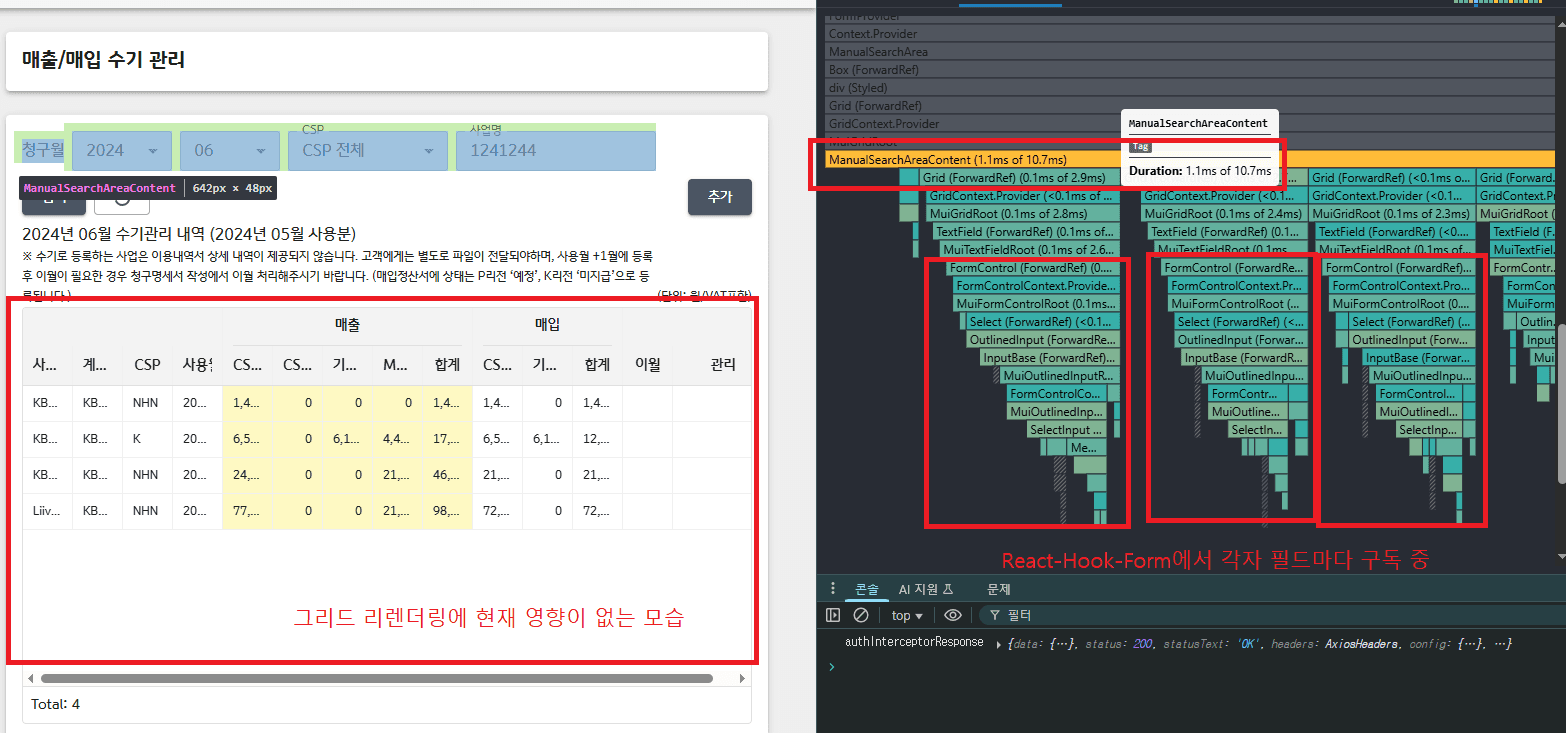
- 상태/props 변화로 부모가 리렌더 → 자식(그리드 등)까지 같이 렌더링되어 React는 새 Virtual DOM과 이전 Virtual DOM을 트리 구조로 비교하고 각 노드의 props가 변경되었는지 확인하게 되는데 이때 항상 새로운 객체로 판단하게 되어 리렌더링이 발생되어 최적화 실패가 일어납니다.
// ❌ MspCostList.tsx - 실제 문제 상황 const MspCostListPage = () => { const {querySearchParams, replaceURL} = useSearchParam({ businessName: selectAttributes.businessName.value, }); // 🔥 문제: API 호출 결과가 매번 새로운 배열 const {mspDistributions, lastCalculatedDate} = useGetDistributionDataCustomerQuery({ businessName: querySearchParams.businessName, }); return ( <MspCostListSearchArea gridApiRef={gridApiRef} selectAttributes={selectAttributes} // 🔥 내부에서 입력 발생 시 Diffing으로 인한 리렌더링이 발생 /> <MspCostListGrid mspDistributions={mspDistributions || []} // 🔥 매번 새로운 배열 참조하게 되어 리렌더링이 계속 발생되어 Grid 자체가 가지고 있는 기능들로 부하가 발생 lastCalculatedDate={lastCalculatedDate} /> ); }; // ✅ React.memo로 임시 해결 const MspCostListGrid = memo(({mspDistributions, lastCalculatedDate}) => { return <Grid rows={rows} />; }); 🔥 React의 얕은 비교 과정 1. 이전 렌더링: mspDistributions = [1, 2, 3] (참조: 0x123) 2. 새로운 렌더링: mspDistributions = [1, 2, 3] (참조: 0x456) 3. React.memo 비교: Object.is(0x123, 0x456) = false 4. 결과: 리렌더링 발생! (내용은 같지만 참조가 다름)-
임시 방편으로
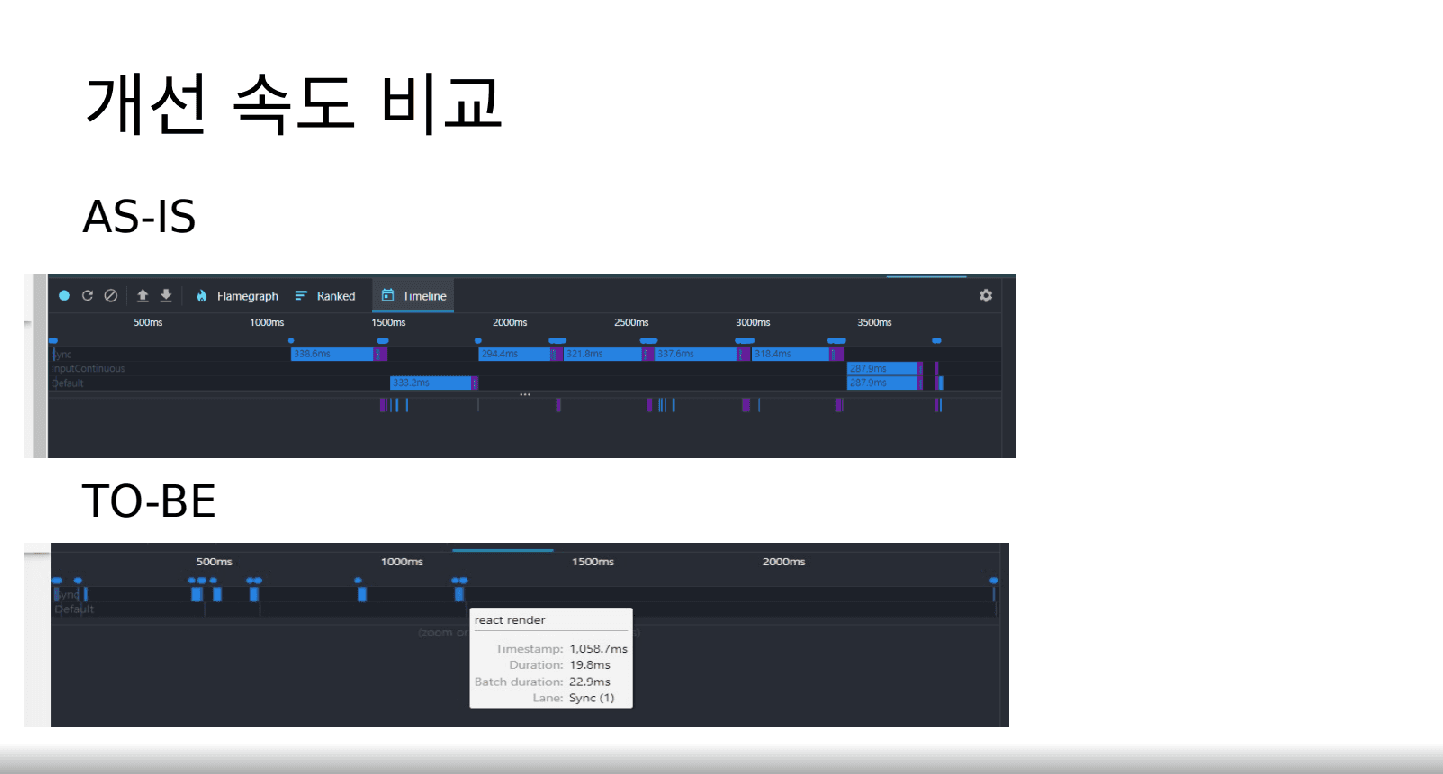
React.memo의 메모라이제이션 기법을 통해shallow compare에 한에서는 최적화를 적용 시켰으며 이미지는 실제 PPT를 작성하여 코드리뷰를 진행 했습니다.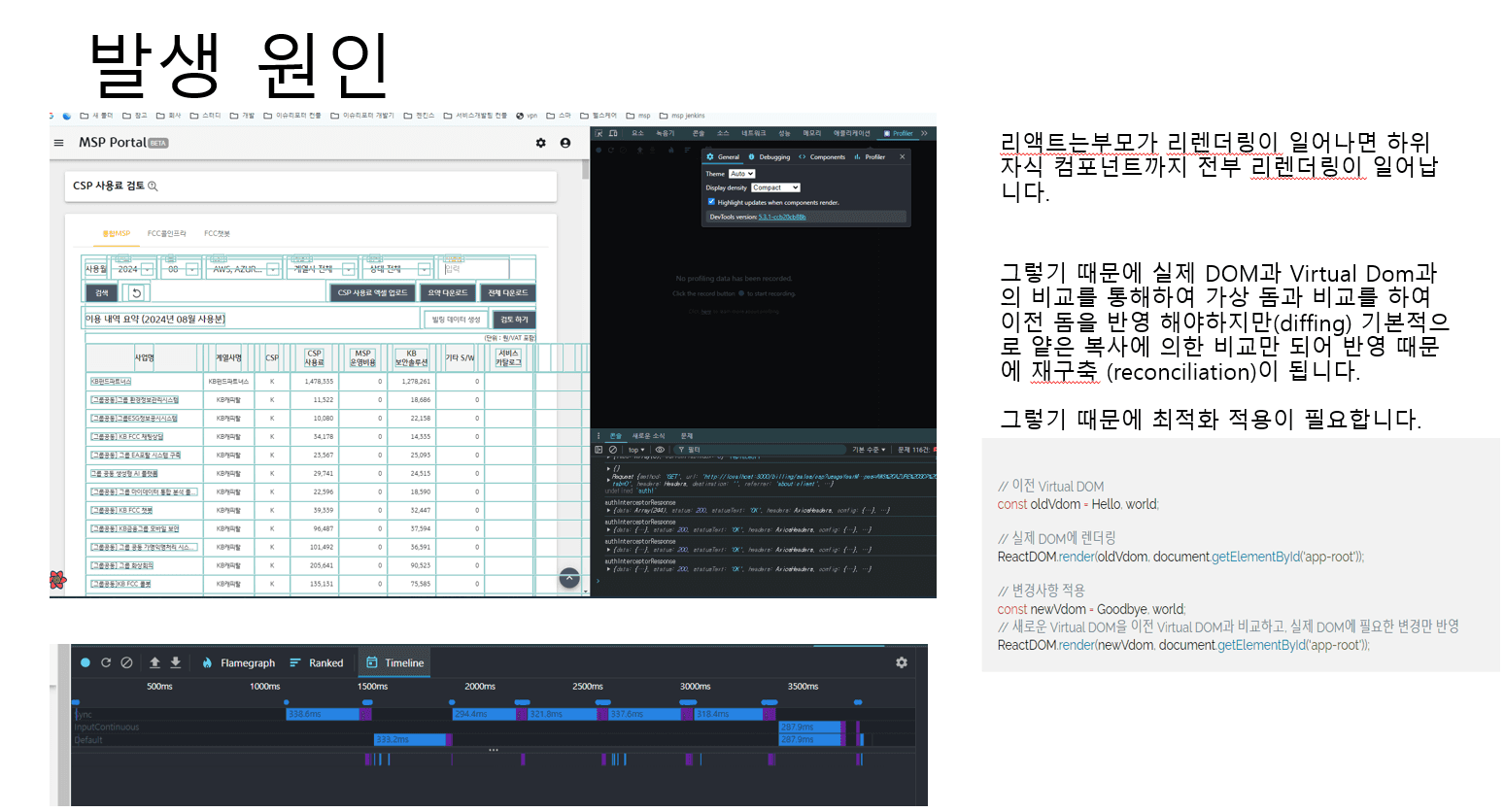
-
문제 2. 문제 1번에서 발생한 리렌더링 과정으로 인해 URL을 다시 반영하는 와중 리렌더링이 발생
// ❌ 2단계: React 컴포넌트에서의 복잡한 사용법
export const useMspCostListQueryString = ({
  querySearchParams,
  replaceURL,
}: useMspCostListQueryStringProps) => {
  const {makeMonthOptions} = useMspCostListSetYearMonth();

  useEffect(() => {
    if (querySearchParams && Object.keys(querySearchParams).length > 0) {
      replaceURL({...querySearchParams});

      const availableMonths = makeMonthOptions(
        Number(querySearchParams.year),
        dayjs().month() + 1
      );

      setSelectForm((prev: FixedCostInitType) => {
        return {
          ...prev,
          .. 코드 중략
        };
      });
    }
  }, [querySearchParams]);

  const querySearchParamsMemo = useMemo(() => {
    return {
      ...querySearchParams,
    };
  }, [querySearchParams]);

  return {querySearchParamsMemo} as const;
};
3. 3단계: 완성
(1) 인지 하기
- 부모, 자식간 컴포넌트 리렌더링 및 상태 관리의 문제를 해결 하지 못했는가?
- 기존에 서버 상태는
react-query로 이미 위임되고 있고 유저 인터렉션에 의해 form과 잦은 상태 변경으로React-hook-Form도입 통해 책임을 분리
- 기존에 서버 상태는
- 적절한 참조 동일성 문제(useMemo 혹은 React.memo 등)를 해결하지 못했는가?
- 참조 안정성 및 비교 안정성을 높이기 위한 커스텀 훅 도입
(2) 근본적인 문제 해결을 위한 새로운 접근
2단계의 문제점들을 분석한 결과, 부모-자식 컴포넌트 간의 불필요한 리렌더링, 복잡한 상태 동기화, 참조 동일성 문제가 핵심임을 파악했습니다. 이를 해결하기 위해 React Hook Form의 내부는 Context API와 구조의 각 필드들이 Subscribe key로 등록 되어 Object.definProperty 즉, **Proxy**와 유사하게 객체에 새로운 **property**를 정의하거나 이미 존재하면 해당 객체를 반환 할 수 있게 되어 필요한 데이터만 갱신하도록 되어 있기에 최적화 상태 관리, 체계적인 URL 파라미터 관리 시스템을 구축 및 React 프로젝트에서는 점진적 개선 및 Vue의 신규 프로젝트에 도입이 되었습니다.
- React 프로젝트: 문제 발생은 없기 때문에 기존 구조를 유지하고 리팩토링 점진적 개선 진행
- Vue 프로젝트: Vue 프로젝트의 경우 기존에 위 언급했던
1단계와 같이 개발한 항목이 있지만 인력 부족 및 유지보수로 인해 신규개발이 되지 않는 점으로 진행을 하지 않고 이전 소스 기반으로 새로 강화된 솔루션을 개발하라는 지시 사항으로 새롭게 다시 접근하여 **Vue-query, Vee-validate, Provide 및 Inject, 양방향 상태 관리 적용(Proxy)**를 도입을 진행하였습니다.
🛠️ React/Vue 구조 비교 표
- 근본적인 개발 Set은 동일하다는 조건이 성립되었고 약간의 문법이 조금씩 달라질 수 있겠다라는 판단을 했습니다.
- 결론적으로는 두 프로젝트가 사용하고자 하는 방향성은 같으면서 기존 아키텍처에서 추구하는 방향성을 깨지 않았습니다.
| 항목 | React | Vue |
|---|---|---|
| 상태 공유 | Context API | Provide/Inject |
| 최적화 | RHF (subscribe key 기반의 Proxy ) |
- 실제로 사용한 프로퍼티 만 추적하여 실제 state를 반환하지 않고
Ref를 반환하고Object.definProperty통해 업데이트를 트리거하여 구독 상태만 리렌더링 | Vue reactivity(v-model 등 Proxy 기반) - Vue 2 (
Object.definProperty) - Vue 3 (
Proxy) | | 상태 관리 흐름 | 단방향(RHF 내부formValues로 상태 갱신) | 양방향(v-model, Proxy로 즉각 반응) |
(3) React 프로젝트 - React Hook Form 도입
- Context API를 통한 상태 공유 최적화
- Props Drilling 제거: 자식 컴포넌트 트리에서 props 전달 불필요
- 리렌더링 최적화: Context 구독 컴포넌트만 리렌더링
// ✅ FormProvider를 통한 상태 공유
const ManualPageV2 = () => {
  useSettingQueryParameter(MANUAL_PAGE_V2_INITIAL_STATE()); // 현재 조회 조건과 설정된 조회 조건을 비교하여 useQueryParameter으로 부터 파라메터 비교
  const forms= useFormWithQueryParams<ManualFormType>(); // useForm을 커스텀 마이징 내부적으로 useQueryParameter를 호출하여 반영

  const onSubmit = (data) => {
    forms.replaceParams(data);
  };

  const handleResetButtonClick = () => {
    forms.reset(MANUAL_PAGE_V2_INITIAL_STATE());
    forms.replaceParams(MANUAL_PAGE_V2_INITIAL_STATE());
  };

  return (
    <FormProvider {...forms}>
      <form onSubmit={forms.handleSubmit(onSubmit)}>
        <ManualSearchArea
          buttonArea={
            <Grid item marginLeft="auto">
              <AuthButton
                pageName="billing"
                buttonName="INV_PUR_MANUAL_MANAGE"
              >
                <Grid id={'grid-ds-add-panel'} />
              </AuthButton>
            </Grid>
          }
          gridArea={
            <>
              <ManualGridTitleContent /> {/* 🔥 Context를 통해 폼 상태 공유 */}
              <ManualGridV2 apiRef={apiRef} />
            </>
          }
          handleResetButtonClick={handleResetButtonClick}
        >
          <ManualSearchAreaContent />
        </ManualSearchArea>
      </form>
    </FormProvider>
  );
};- React Hook Form를 통한 상태 변화 감지
- 필요한
TextField만 구독되어 상태가 변화 됩니다. useController의 경우는 Controller의 Custom Hook 형태로 RHF에서 제공되며MUI와 같은 라이브러리와 같이 사용 할 시 편리합니다.
- 필요한
// ✅ React Hook Form의 JavaScript Proxy 활용
const ManualSearchAreaContent = () => {
  const {control, getValues, setValue} = useManualFormContext(); // useFormWithQueryParamsContext 구현

  ... 코드 중략...

  const {field: monthField} = useController({
    control,
    name: 'month',
  });

  // 🔥 JavaScript Proxy를 통한 지연 평가 - 실제 접근 시에만 상태 추적
  const monthOptions = useMemo(() => {
    if (!isLoading) {
      const option = createMonthOptions(getValues('year'));
      const find = option.find(item => {
        return Number(item.value) === Number(getValues('month'));
      });
      if (!find) setValue('month', dayjs().format('MM'));
      return option;
    }
    return [];
  }, [isLoading, getValues, yearOptions]);

  return (
    <TextField
      {...monthField}
      value={monthField.value?.toString().padStart(2, '0')}
      onChange={monthField.onChange}
      fullWidth
      size="small"
      select
    >
      {renderMenuItems({
        options: monthOptions,
      })}
    </TextField>
  );
};- URL 및 상태 관리를 하기 위한 커스텀 훅
- 페이지네이션 시 기존 URL Query String 유지
- 목록 > 상세 접근 시 목록의 상태 데이터 유지 기록 및 재 반영
- 초기 데이터 값 반영 및 변경 데이터 감지 등
const useFormWithQueryParamsContext = <T extends FieldValues>() => {
  const method = useFormContext<T>();
  const {replace, push} = useRoute();
  const parsingQueryStringValue = useQueryParameter(); // 현재 URL Query Params를 파싱

  const replaceParams = (
    params: Partial<T>,
    options?: ReplaceParamsOptions
  ) => {
    replace(
      options?.keepAllQueryParams // 페이지 네이션 여부에 따른 기존 URL 유지
        ? {...parsingQueryStringValue, ...params}
        : {...method.getValues(), ...params}
    );
  };

  return {...method, replaceParams, pushParams};
};
export const useSettingQueryParameter = <T extends Record<string, any>>(
settingQueryParams: T
) => {
const currentQueryParams = useQueryParameter();
const {replace} = useRoute();
useEffect(() => {
const settingQueryKey = Object.keys(settingQueryParams);
const currentQueryKey = Object.keys(currentQueryParams);
const isInvalidQueryParams = currentQueryKey.some(
key => !settingQueryKey.includes(key)
);
const isInvalidQueryKeyLength =
currentQueryKey.length !== settingQueryKey.length;
if (isInvalidQueryParams || isInvalidQueryKeyLength) {
replace(settingQueryParams);
}
}, [settingQueryParams, currentQueryParams]);
};(3) Vue 프로젝트 - provide , inject 를 활용하여 제대로 된 반응성 사용 및 vee-validate 사용하기
provide,inject를 활용하여 Vue의 양방향 바인딩 반응성 사용- Props Drilling 제거: 자식 컴포넌트 트리에서 props 전달 불필요
<template>
  <layout>
    <div class="flex justify-between items-end">
      <DefectListDashboard />
      <AuthorityButtonV2 permissionKey="DEFECT_INSERT" @click="handleDevTaskCreate">
        <template #default="{ onClick, isDisabled }">
          <Button variant="yellow" type="button" :disabled="isDisabled" @click="onClick">
            등록
          </Button>
        </template>
      </AuthorityButtonV2>
    </div>
    <ValidationObserver ref="observer">
      <form @submit.prevent="handleSubmit">
        <DefectSearchArea>
          <div class="clear-search-btn-area">
            <div class="refresh-search">
              <Button variant="refresh" @click="handleReset" size="small">
                <i class="fi fi-rr-rotate-right" />
              </Button>
              <Button type="submit" :debounce="1000">검색</Button>
            </div>
          </div>
        </DefectSearchArea>
        <DefectListGridArea />
      </form>
    </ValidationObserver>
  </layout>
</template>

<script lang="ts">
import { defineComponent, onMounted, reactive, ref } from '@vue/composition-api';
import { ValidationObserver } from 'vee-validate';
import { provideFormContext } from '../context/useDefectProvideFormContext';
import { useSettingQueryParameter } from '@/composable/useSettingQueryParameter';
import { useFormWithQueryParams } from '@/composable/useFormWithQueryParams';
import { DEFECT_LIST_INITIAL_STATE } from '../constants';

export default defineComponent({
  name: 'DefectList',
  components: { ValidationObserver },
  setup() {
    const observer = ref();

    // URL 파라미터와 폼 상태 동기화
    const initialState = reactive(DEFECT_LIST_INITIAL_STATE());
    const settingParams = useSettingQueryParameter(initialState);
    const forms = useFormWithQueryParams({
      defaultValues: {
        ...settingParams,
        page: 1,
        itemsPerPage: 10,
      },
    });

    // Provide/Inject로 상태 공유
    const formContext = provideFormContext();

    const handleSubmit = async () => {
      const isValid = await observer.value?.validate();
      if (!isValid) {
        // 검증 실패 처리
        return;
      } else {
        // 🔥 검색 조건 변경 시 페이지 1로 초기화
        forms.formData.value.page = 1;
        forms.replaceParams(forms.formData);
      }
    };

    const handleReset = () => {
      const initialStateData = {
        ...initialState,
        workflowCodes: initialState.workflowCodes.map((item) => item),
      };
      forms.replaceParams(initialStateData);
      observer.value?.reset();
    };

    return {
      observer,
      handleSubmit,
      handleReset,
    };
  },
});
</script>- Vue의 반응성을 통한 상태 변화 감지
- Javacript의 Proxy + Reflect 혹은 defineProperty 를 통해 상태 변화를 동작하게 합니다.
<template>
  <div class="search-filter-area">
    <div class="input-row">
      <TextField
        v-model="formData.workflowCodes"
        input-type="multiSelect"
        :select-options="workflowOptions"
      />
      <TextField
        v-model="formData.priorityCodes"
        input-type="select"
        :select-options="priorityOptions"
      />
      ... 코드 중략 ...
    </div>
    <slot />
  </div>
</template>

<script lang="ts">
import { defineComponent, inject, toRefs, computed } from '@vue/composition-api';
import { TextField } from '@/components';

export default defineComponent({
  name: 'DefectSearchArea',
  components: { TextField },
  setup() {
    // 🔥 Inject로 상태 주입받기
    const formContext = inject('defectFormContext');
    const { formData, commonCode } = toRefs(formContext as any);

    // 🔥 Computed로 옵션 관리 - 반응성 유지 (따로 UI와 비지니스를 분리하여 훅으로 관리해도 되나 코드를 보여주기 위한 예시로 노출)
    const workflowOptions = computed(() => [
      { label: '전체', value: 'ALL' },
      ...(commonCode.value.workflow?.map((item) => ({
        value: item.codeValue,
        label: item.codeName,
      })) || []),
    ]);

    const priorityOptions = computed(() => [
      { label: '전체', code: 'ALL' },
      ...(commonCode.value.priority?.map((item) => ({
        code: item.codeValue,
        label: item.codeName,
      })) || []),
    ]);

    return {
      formData,
      workflowOptions,
      priorityOptions,
    };
  },
});
</script>
URL 및 상태 관리 일부 커스텀 훅
- 페이지네이션 시 기존 URL Query String 유지
- 목록 > 상세 접근 시 목록의 상태 데이터 유지 기록 및 재 반영
- 초기 데이터 값 반영 및 변경 데이터 감지 등
const useFormWithQueryParams = () => {
  const parsingQueryStringValue = useQueryParameter();
  const { replace, push, route } = useCustomRoute();

  const replaceParams = (params: any, options: any = {}) => {
    ... 코드 중략 ...
    const queryParameters = convertEmptyArrayToString(
      options.keepAllQueryParams
        ? { ...(parsingQueryStringValue.value), ...paramsWithTab }
        : { ...getValues(), ...paramsWithTab }
    );

    if (options.keepAllQueryParams) {
      push(route.path, queryParameters);
    } else {
      replace(queryParameters);
    }
  };

  return {...method, replaceParams, pushParams};
};
export const useSettingQueryParameter = <T extends Record<string, any>>(settingQueryParams: T) => {
const currentQueryParams = useQueryParameter();
const { replace } = useCustomRoute();
const reactiveSettingParams = reactive(settingQueryParams);
watch(
[() => currentQueryParams, () => reactiveSettingParams],
([current, setting]) => {
const settingQueryKeys = Object.keys(setting );
const currentQueryKeys = Object.keys(current.value);
const isInvalidQueryParams = currentQueryKeys.some((key) => !settingQueryKeys.includes(key));
const isInvalidQueryKeyLength = currentQueryKeys.length !== settingQueryKeys.length;
if (isInvalidQueryParams || isInvalidQueryKeyLength) {
replace(setting);
}
},
{ deep: true, immediate: true }
);
return reactiveSettingParams;
};4. 최종 개선 비교
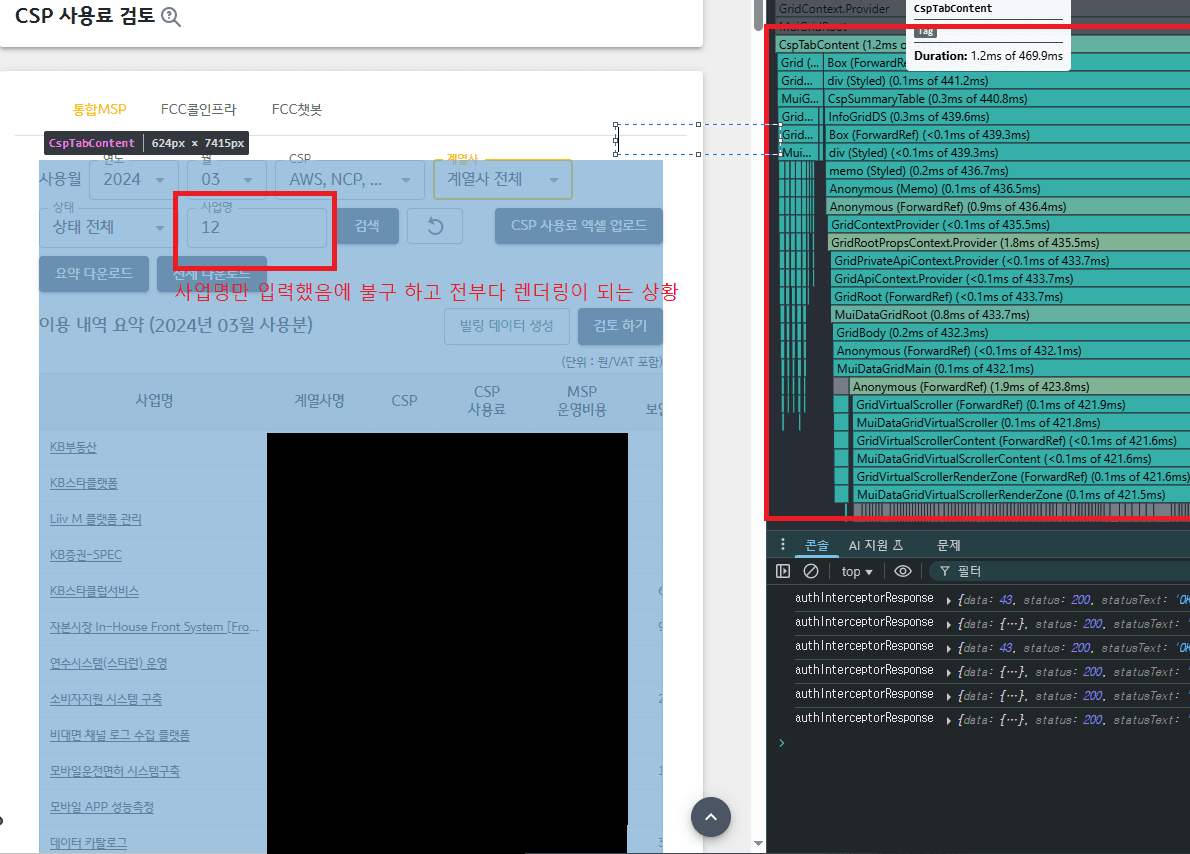
(1) 개선 전 – 모든 상태와 URL 관리가 부모에서 집중 (비효율 & 무의미한 렌더링 발생)
- 상태 변경 시마다 전체 컴포넌트가 리렌더링으로 성능 저하 발생 및 유지보수성, 복잡
(2) 개선 1버전 – React.memo 임시 도입으로 일부 최적화 (리렌더링만 억제)
- 부모-자식 props 전달 구조 자체는 바뀌지 않았으나, React.memo를 도입해 props가 동일하면 자식 컴포넌트의 불필요한 렌더링을 임시로 차단.
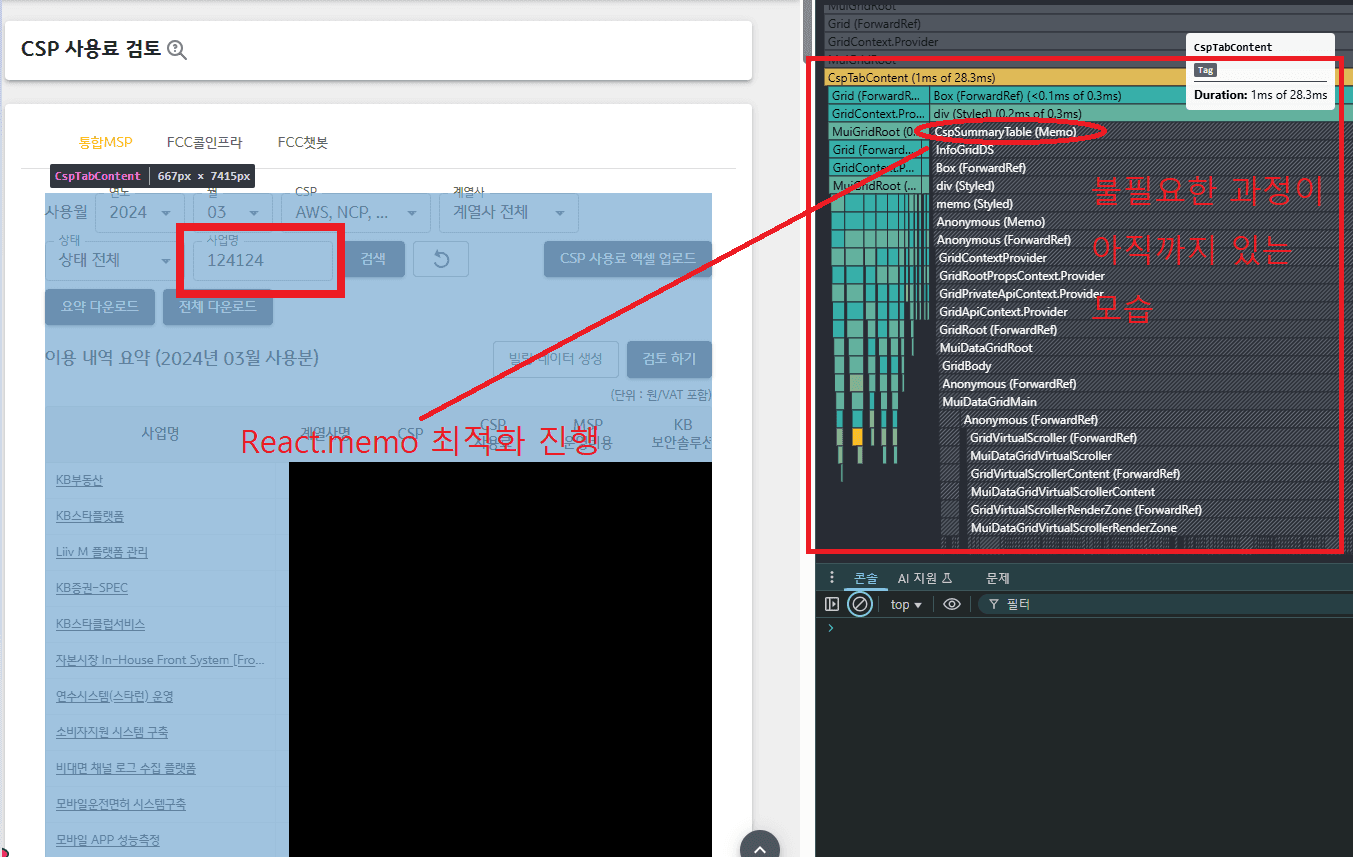
(3) 개선 완전형 – RHF 도입과 컨텍스트 분리로 구조적 해결 (상태/URL 최적화, 책임 분리)
- React Hook Form(RHF) 도입으로 폼 상태 관리와 UI 상태를 점진적으로 리펙토링을 진행하여 완전히 분리
- RHF가 내부적으로 변경이 발생한 컴포넌트만 리렌더링.
- URL 파라미터 관리도 별도 훅으로 분리해, URL과 폼 상태의 동기화 데이터를 어디서든 호출이 가능